
If a WoW Forever addon keeps resetting, first establish exactly what disappears and when. One addon's chosen profile, a controller layout and every addon's saved configuration need different checks. Preserve your current files before attempting a broad reset.
Our WoW Forever addon selection guide explains which tools manage quests, maps and custom displays. Check whether two installed tools are handling the same feature.
Start with one harmless setting you can recognize immediately, such as a window's position. Leave the rest of your configuration alone while testing it.
Early beta reports do not diagnose your current client
Players reported SavedVariables loading problems in September. In one detailed developer report, data reached disk but did not return after starting the client. A later September 25 reply reported working persistence on build 70009.
Those are dated observations from particular setups. Record your current Forever build and addon version before applying advice from an old thread. The earlier reset discussion also contains broad file-deletion workarounds; preserve your files and use the narrower checks below first.
1. Check the installation and profile
Confirm that you launched the same Forever installation you configured. Multiple game folders can make an update or test appear to have erased settings when a different client was opened.
Check the addon's selected profile if it has profile controls. Compare the affected character with the one you configured. Note whether the option is character-specific or shared according to the addon's own settings description.
A useful observation is precise: “This window position resets on this character after a full restart.” Keep that statement separate from assumptions about which file or game system caused it.
2. Compare a UI reload with a full restart
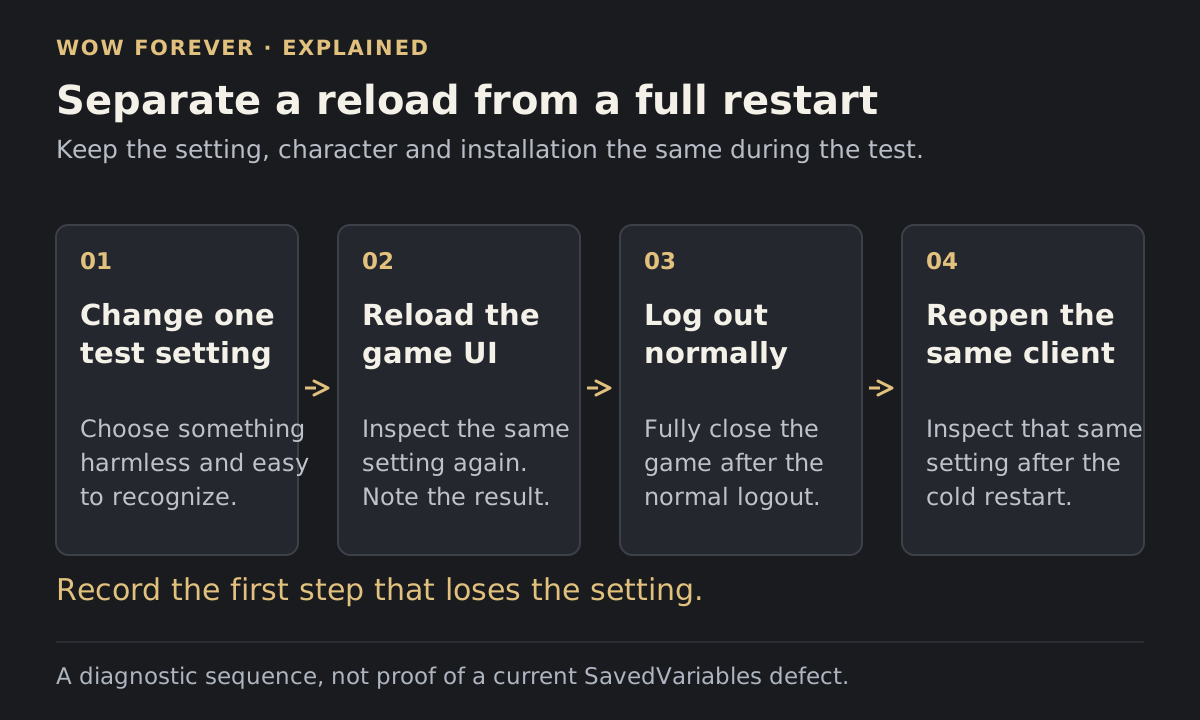
Change only the test setting. Use the game's normal UI reload, then inspect the same setting again. Next, log out normally, close the client fully and reopen the same installation.
| Result | What to investigate next |
|---|---|
| The setting disappears immediately | The option, selected profile or another feature changing it |
| It survives a reload but disappears after reopening | Startup/profile behavior and persistence |
| It changes only after switching characters | Per-character configuration and profile selection |
| It changes only after a crash or forced close | Repeat with a normal logout before drawing a conclusion |
Write down which step changes the result. Repeatedly rebuilding your entire interface makes that distinction harder to see.
 Enlarge
3. Isolate the affected addon
Update the addon and its required dependencies from its maintained Forever release. Temporarily disable other addons and repeat the one-setting test. Keep dependencies enabled when the author requires them.
If the setting now persists, re-enable other addons in small groups until you can narrow down the interaction. Check for overlapping functions, such as two addons managing the same window or layout.
If the problem remains with only the affected addon and dependencies, preserve that simpler reproduction. It gives the author a clearer case than a report from a large setup with many simultaneous UI changes.
4. Treat gamepad layouts as a separate check
Blizzard's October 8 beta notes added layouts saved per UI type and moved gamepad action-bar options into Edit Mode. The notes say the old option values were not migrated.
If switching input modes changes the layout, inspect the active UI type and its Edit Mode layout before concluding that an addon lost its database. Compare the same setting in the same presentation mode.
5. Back up before a full UI reset
Blizzard's UI reset procedure closes the game, prevents addon-manager resync and renames Cache, Interface and WTF before relaunching. This is a broad troubleshooting step that replaces the active interface configuration.
Keep dated copies of your current folders first. Follow the official instructions for the selected installation and retain the originals until you have checked what the reset changed.
If you still need help, send the author your client build, addon versions, selected profile, exact setting and the first step that loses it. Include whether the same test failed with other addons disabled. State the result of the cold restart separately from the UI reload so the author can follow the same sequence.